Personalization
See how Typeless adapts to your unique style and tone.
How Personalization works
With Personalization, Typeless adapts to your phrasing and writing habits to create dictation in your unique style and tone. The more you use it, the more your dictation reflects how you write, from formal or casual tones to concise or detailed styles. There is nothing to set up.
Follow your personalization progress to see how Typeless aligns with your style and tone over time. You can find it on the Personalization card on Home, then click View report for more detail.
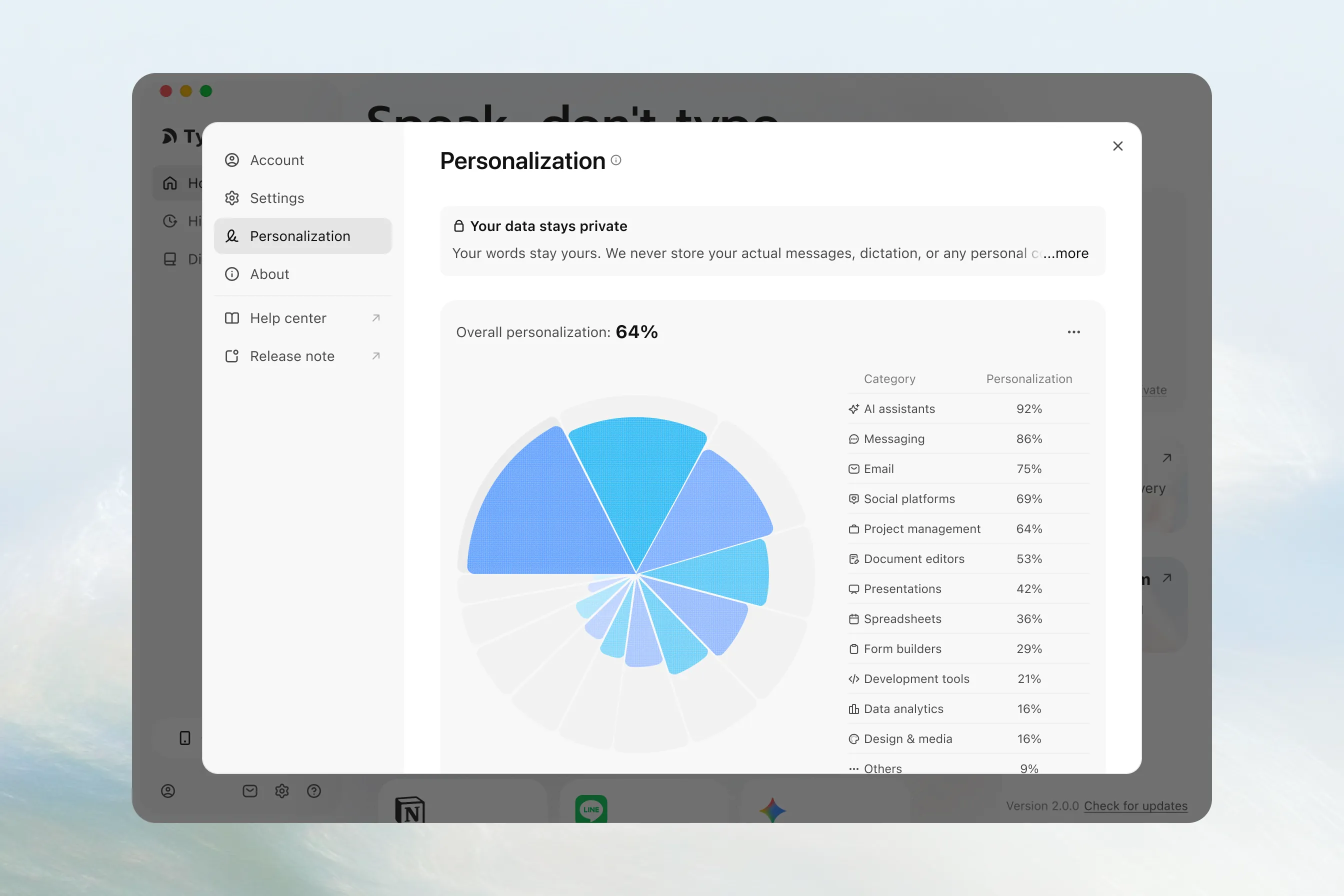
Your data stays private
Your words stay yours. Typeless never stores your actual messages, dictation, or personal content.
Our AI learns your writing style by observing general patterns only like whether you prefer formal or casual language in different contexts. These patterns are completely abstract and never include any specific information from what you've written or said.
Think of it like recognizing your handwriting without ever reading the words. We follow a strict zero data retention policy for all your content, ensuring your privacy remains fully protected.
View your Personalization settings
In the Typeless desktop app, click the Settings icon in the bottom-left corner, then click Personalization.
If you disable this, Typeless will stop learning your writing style and switch to non-personalized phrasing. You can change this by clicking the More (•••) button in the upper-right corner of the Overall personalization section.